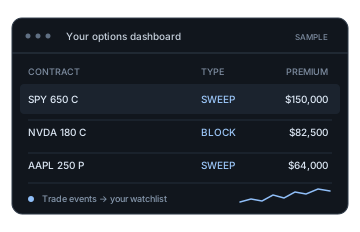
Monitor trades in your own dashboard
Keep a personal watchlist or dashboard updated as trades arrive, choosing which contracts, trade sizes, and premiums to display. SSE delivery lets your application react to events through a persistent connection.
Bullflow’s Options Flow API gives you a live feed of options trades with contract details, execution data, Greeks, and unusual-activity scores. Use it to build your own dashboard, research incoming trades, or run alerts based on the criteria you care about.
Our sweep detection and consolidation algorithm identifies sweep activity and groups related executions, helping you see the trade behind the individual prints. Bullflow combines that activity with contract details, execution data, Greeks, and SigScore, then delivers structured events your application can filter, display, or analyze as they arrive.
Real-time trades · SSE delivery · Structured JSON
The streaming endpoint keeps an HTTP connection open and delivers trade events as JSON messages, so your application can process incoming activity without repeatedly requesting updates. The example below shows how to connect with cURL and the fields you can expect in a trade event.
View API referencecurl --no-buffer \
'https://api.bullflow.io/v1/streaming/live-options-flow' \
--header 'X-API-Key: YOUR_API_KEY'HTTPS / Server-Sent Events
{
  "event": "trade",
  "id": "2026-09-25:314159",
  "data": {
    "id": "2026-09-25:314159",
    "tradeDate": "2026-09-25",
    "timestamp": 1790344800,
    "symbol": "O:SPY261016C00650000",
    "ticker": "SPY",
    "optionType": "C",
    "expirationDate": "2026-10-16",
    "strikePrice": 650,
    "tradeType": "SWEEP",
    "side": "Ask",
    "premium": 150000,
    "tradePrice": 3,
    "tradeSize": 500,
    "spotPrice": 649.5,
    "currentBid": 2.95,
    "currentAsk": 3,
    "currentVolume": 1500,
    "openInterest": 1000,
    "impliedVolatility": 25,
    "sigScore": 0.85,
    "isCancelled": false,
    "isOutOfSequence": false
  }
}
Trade event with illustrative values from the API reference; null Greek fields are omitted for clarity. Scroll to view the example.
The live flow endpoint is currently in beta and requires an active API subscription. To try the request, replace YOUR_API_KEY with your key and run it from your server or terminal.
Whether you are building a personal dashboard, an alert service, or a research script, the API gives you a consistent format for processing incoming trades. Bullflow’s other endpoints can provide historical activity and additional market context when you need to investigate further.
Keep a personal watchlist or dashboard updated as trades arrive, choosing which contracts, trade sizes, and premiums to display. SSE delivery lets your application react to events through a persistent connection.
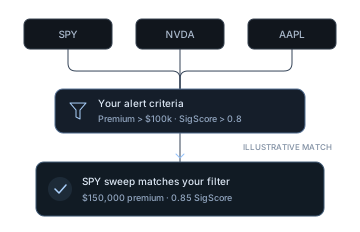
Evaluate incoming trades against the criteria you define, such as ticker, premium, or unusualness. Bullflow algo alerts and matches for your saved custom alerts are also available through a separate alerts stream.
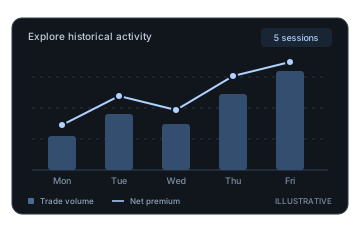
Use historical options flow to review earlier activity, then add net premium or gamma exposure from the wider API when your research calls for a broader view of the ticker.
Options Flow API / FAQ
An options flow API provides programmatic access to options trades so you can analyze activity or display it in your own software. Bullflow delivers newly published trades for the current U.S. Eastern trading date as JSON messages over Server-Sent Events (SSE), including contract, premium, execution, and Greek fields.
The live options flow endpoint delivers newly published trade events that your application can process using its own criteria. If you want Bullflow algo alerts or matches for your saved custom alerts, you can receive those through the separate alerts endpoint.
You can query recorded trades through the historical options flow endpoint, using filters such as date, ticker, contract, premium, and trade size. Historical queries are separate from the live stream, which only delivers new trades after you connect and does not replay missed events when you reconnect.
Once you have an active Bullflow API subscription, generate a key from your API dashboard and send it in the X-API-Key request header, or connect with OAuth. Each key supports one active live-flow connection, with a heartbeat every 10 seconds to help your client monitor the connection. The API reference covers reconnection guidance, rate limits, and error handling.
Standard Bullflow API subscriptions cover personal use. If you plan to include the data in a commercial product or redistribute it to customers, contact Bullflow to discuss the appropriate license before you begin.
Start building
Choose an API subscription and create your key to begin streaming trades into your own tools. The documentation includes request examples, field definitions, and connection guidance to help you build your integration.
API subscriptions are for personal use; contact us about commercial licensing.